Ki Data (KD)
Introduction
 Ki Data (KD) is a simple and concise declarative language used to describe typed values, ranges, lists, maps, trees and grids. Although XML is an excellent format for marking up documents and embedding tags in free-form text, it can be cumbersome for expressing basic data structures. KD is designed to be readable at a glance. See the FAQ for a comparison of KD to other declarative languages.
KD is ideal for uses ranging from build files and object serialization to UI layouts and automation scripts. Its modern type system, schema, support for quantities with SI units, and high precision decimal type make it well suited for apps in areas such as finance and STEM. In addition to data structures, KD provides portable higher order types for URLs, versions, dates, times, email addresses, durations, quantities with units, ranges, optionally typed grids, coordinates, geographic coordinates, and binary data.
KD Tag
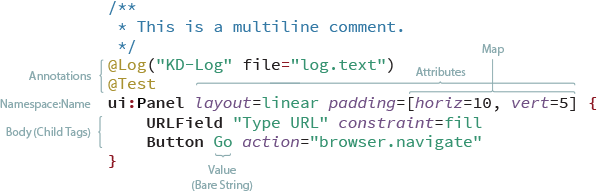
Examples
@Personal // I'm an annotation
favorite_books {
  book "The Hobbit" author="J. R. R. Tolkien" published=1937/9/21
  book "Dune" author="Frank Herbert" published=1965/8/1
}

requires {
  module http://kixi.io/packages/widgets version = 5.2.beta-2 .. 5.9
  module http://kixi.io/packages/kd version = 5.0.0 .. _
}

@UI(framework="HTML5")
@Test
browserBar layout="horizontal" margin=[horizontal=4 vertical=2] {
  button icon="arrow.left" action="browser.back"
  button icon="arrow.right" action="browser.forward"
  spacer 10
  webkit:urlField constraint="fill" action="browser.toURL"
  button "Go" style="simple"
  spacer 10
  menubutton {
    "New Tab" action="browser.newTab"
    "New Window" action="browser.newTab"
    separator
    "View Source" action="browser.viewSource"
  }
}
Whitespace and Lines
Newlines are significant in KD. Other whitespace is ignored. You can force a newline with a semicolon (;) and escape the end of a line with a backslash (\) to continue the tag definition on the next line.
Ki Type System (KTS)
KD uses the portable Ki Type System, which it shares with Ki Markup and Ki Script. In the example above the value of the “published” attribute is a date object, not a string. Ki’s intuitive API is available for supported platforms.
Structure of a Tag
The structure of a tag is:
  annotation(s)
  namespace:name value(s) attribute(s) {
    children
  }
A tag must have either a name or, in the case of an anonymous tag, value(s) and / or attribute(s). All other components are optional. If the name portion is omitted the tag name defaults to the empty string (“”). Names and namespaces are identifiers.
For values and child tags, order is significant and duplicates are allowed. For attributes, order is not significant and duplicates are not allowed.
Annotations appear before or above the rest of the tag. The can be a simple name such as @Test or parameterized with values and/or attributes like a tag. Annotations provide metadata for a tag which can be used for post-processing, logging, testing, etc.
@Test tag "Some data"

@Test(true)
tag "Some data"

@Test(true log="output.txt")
tag "Some data"
Tag Definition Examples
- A name:
book - A name with a value:
book "Lord of the Rings" - A name with a list:
nums 3 5 7 11 - A name with attributes:
pets chihuahua="small" dalmation="hyper" mastiff="big"
A tree of tags (i.e. tags with children)
plants {
    trees {
        deciduous {
            elm
            oak
        }
    }
}
A matrix
myMatrix {
   4  2  5
   2  8  2
   4  2  1
}
A Tree of Nodes with Values and Attributes
folder "myFiles" color="yellow" protection=on {
    folder "my images" {
        file "myHouse.jpg" color=true date=2005/11/05
        file "myCar.jpg" color=false date=2002/01/05
    }
    folder "my documents" {
        document "resume.pdf"
    }
}
Children are tags and may be nested to an arbitrary depth. They are indented by convention but spaces and tabs are not significant in the KD language.
Tags can be listed separated by semicolons on the same line:
tag1; tag2 "a value"; tag3 name="foo"
Anonymous Tags
Tags with no name are known as anonymous tags. They are automatically assigned the empty string (“”) as their name.
Example: An Anonymous Tag
greetings {
   "hello" language="English"
}

# If we have a handle on the "greetings" tag we can access the
# anonymous child tag by calling
#    var greeting = greetingTag.getChild(0)
Anonymous tags must have at least one value
Anonymous tags must be prefixed with a value or attribute. The addition of anonymous tags as a prefix was an addition to KD 2.0. It also allow KD to work well as a simple properties file:
Property file meeting.kd:
docname = "End of Year Meeting"
date = 2005/11/05
attendies = ["Yuki" "Bill" "Manuel"]
Output:
root {
   docname = "End of Year Meeting"
   date = 2005/11/05
   attendies = ["Yuki" "Bill" "Manuel"]
}
Access:
    // Read a KD String, File, URL or Resource
    val root = KD.read("""
        name = jose;
        age = 25
    """)

    println(root)
    println(root.getProperty("name")) // "jose"
    println(root.getProperty("age")) // 25
Identifiers
An Ki identifier starts with a unicode letter, emoji or underscore (_) followed by zero or more unicode letters, numbers, underscores (_), and dollar signs ($). Examples of valid identifiers are:
- myName
- _myName
- 😀myName
- myName123
- my_name
- my_name_
Literal Types
KD supports 27 literal types, some of which have variants. They are:
| Type | Description | Examples | Notes |
|---|---|---|---|
| String | Unicode text | “hello”, “ท้องฟ้า”, “대양” | See String |
| Char | Unicode character | ‘A’, ‘Ж’, ‘桜’ | |
| Int | 32b signed integer | 123, 424_235_412, 0xFF | Optional underscores for legibility |
| Long | 64b signed integer | 123L, 424_235_412L | |
| Float | 32b signed float | 123.43F, 123.43f | |
| Double | 64b signed float | 123.43, 123.43D, 123d, 5.421_523 | Optional underscores for legibility |
| Dec | 128b+ signed decimal | 123.44BD, 123.44bd | See notes below* |
| Bool | boolean | true, false, on, off | |
| URL | URL | https://www.nasa.gov, ldap://ds.example.com:389 | |
| Date | simple date | 2005/12/05, 1592/4/8 | See Date |
| LocalDateTime | local date & time | 2021/12/05@05:21:23.53 | See LocalDateTime |
| ZonedDateTime | DateTime w/ zone | 2021/12/05@05:21:23.53+03 | See ZonedDateTime |
| KiTZDateTime | DateTime w/ named zone | 2021/12/05@05:21:23.53-US/PST | See KiTZDateTime |
| Duration | length of time | 12:74:42, 23days:05:21:23.53, 85ms | See Duration |
| Version | Version descriptor | 4.2.5, 5.2-beta, 2.8.5-alpha-2 | See Version |
| Blob | Bytes encoded in base64 | .blob(sdf789GSfsb2+3324sf2) | See Blob |
| GeoPoint | GPS coordinates | .geo(37.7749, -122.4194) | See GeoPoint |
| Email address | kai@rockets.com, foo.noa@reptilezoo.org | ||
| Grid<T> | 2D Grid | .grid(1 2 3; 40 50 60), .grid<Int>(3 6 9) | See Grid |
| Coordinate | Grid location | .coordinate(x=2, y=5), .coordinate(c=”A”, r=10) | See Grid & Coordinate |
| Quantity<U> | An amount in Units | 23cm, -15mL, 2.5m³, 5.5e(-7)m | see Quantity |
| Range<T> | Range for comparables | 2..5, 2.0..<3.5, 2.0<.._ | See Range |
| List<T> | Ordered list | [1 2 3], [4, 5, 6], [‘a’ ‘b’ ‘c’] | Commas optional; See List |
| Map<K, V> | Set of key=value pairs | [name=”Rufus” color=”rust”], [‘a’=1, ‘c’=3] | Commas optional; See Map |
| Call | Function call | rgb(120, 140, 20, alpha=.5) | Commas optional; See Call |
| Snip | Embed content | .snip(../myFile.kd), .snip(“https:/kixi.io/KDExample.kd”) | See Snip |
| nil | Absence of a value | nil, null |
*For platforms that do not support this level of precision the implementation should provide a conformant number type.
String
There are four types of Strings in KD. They are:
| Name | Description | Examples | Notes |
|---|---|---|---|
| Simple | Single line with escapes | “Hello”, “Line1\nLine2” | ‘\n’ will be escaped |
| Raw | Single line without escapes | @”\files\readme.md”, @”whitespace:\t\n” | ’\’ and white space “as is” |
| Block | Multi-line with escapes | ””“ One Two ””” | |
| BlockRaw | Multi-line with no escapes | @””“ newline: \n slash: \ ””” |
Notes
- The white space prefix of lines in Block and BlockRaw is truncated if it matches the white space before the closing quotes (“””). Example:
- Backquotes were previously allowed as literal strings. That is no longer the case. As of KD v2, backquotes will be used for regular expressions.
myTag text="""
    ABC
        def
    123
    """
The String block for “myTag” will remove two spaces from the beginning of each line and produce the string:
"""
ABC
    def
123
"""
The leading quote mark’s location is disregarded, and may appear on the same line as the attribute or below. This behavior is identical to Swift’s multi-line String literals.
Date and DateTime Literals
KD’s date and time related types are:
- Date A simple date with year/month/day.
- LocalDateTime A local (relative) DateTime with year/month/day@hour:minute(:second(.fractional_secong)?)?
- ZonedDateTime A DateTime with a time zone (see below)
-
KiTZDateTime A DateTime with a named time zone (see below) A time-of-day that isn’t attached to a date can be represented by using a Duration treated as an offset from midnight.
For LocalDateTime and ZonedDateTime single digit month of the year, day of the month, hour, second and fractional second do not require leading zero padding when parsed. Zeros will be used in the canonical representation of single digit months of the year, days of the month and hours of the day, but not seconds of the minute or fractional seconds. For example, and input of 2020/5/9@2:53:2.5 will be parsed correctly, and will output: 2020/05/09@02:53:2.5.
Fractional second accuracy goes to 9 digits (i.e. nanoseconds). You can use underscores to improve legibility. Example: 8.352_432_632 for 8.352432632 seconds.
Date
Date literals in KD are specified as year/month/day. Examples:
- 2005/12/05
- 2020/09/18
- 2020/9/18
LocalDateTime
Local DateTime literals don’t specify a time zone. They are to be interpreted as local (relative) time. The timezone is never set, and is to be considered relative to the time and place of the reader.
Format: yyyy/mm/dd @hh:mm(:ss(.fractional)?)?
| Example | Description |
|---|---|
| 2005/09/05 @05:08:03.532 | Date and time with all components zero padded (canonical form) |
| 2020/9/9 @05:08:3.532 | Date and time with zero padding omitted |
ZonedDateTime
ZonedDateTime literals specify a date, time and zone offset. Zones can be specified with -Z, -UTC, [+/-]offset, or -KiTZ:
Format: yyyy/mm/dd @hh:mm(:ss(.fractional)?)?(-Z | -UTC | [+/-]offset | -KiTZ)
| Example | Description |
|---|---|
| 2005/12/05@05:21:23.532-Z | UTC (no offset) |
| 2005/12/05@05:21:23.532-UTC | UTC (no offset) |
| 2005/12/05@05:21:23.532-GMT | UTC (no offset) |
| 2005/12/05@05:21:23.532-JP/JST | Ki Time Zone (KiTZ) JP/JST: Japan Standard Time - converted to offset |
| 2005/12/05@05:21:23.532-US/PST | Ki Time Zone (KiTZ) US/PST: US Pacific Standard Time - converted to offset |
| 2005/12/05@05:21:23.532-DE/CET | Ki Time Zone (KiTZ) DE/CET: Germany Central European Time - converted to offset |
| 2005/12/05@05:21:23.532+2 | UTC+02 offset |
| 2005/12/05@05:21:23.532-2 | UTC-02 offset |
| 2005/12/5@05:21:23.532+2:30 | UTC+02:30 offset |
KiTZDateTime
KiTZDateTime literals specify a date, time and KiTZ (named time zone). Zones can be specified with -KiTZ:
Format: yyyy/mm/dd @hh:mm(:ss(.fractional)?)-KiTZ
| Example | Description |
|---|---|
| 2005/12/05@05:21:23.532-JP/JST | Ki Time Zone (KiTZ) JP/JST: Japan Standard Time |
| 2005/12/05@05:21:23.532-US/PST | Ki Time Zone (KiTZ) US/PST: US Pacific Standard Time |
| 2005/12/05@05:21:23.532-DE/CET | Ki Time Zone (KiTZ) DE/CET: Germany Central European Time |
Ki Time Zone (KiTZ)
KiTZ provides a standardized set of timezone identifiers using the format CC/TZ where CC is the ISO 3166-1 alpha-2 country code and TZ is the standard timezone abbreviation for that region.
Common KiTZ Examples:
| KiTZ ID | Country | Offset | Description |
|---|---|---|---|
| US/PST | United States | -08:00 | Pacific Standard Time |
| US/PDT | United States | -07:00 | Pacific Daylight Time |
| US/EST | United States | -05:00 | Eastern Standard Time |
| US/EDT | United States | -04:00 | Eastern Daylight Time |
| US/CST | United States | -06:00 | Central Standard Time |
| US/MST | United States | -07:00 | Mountain Standard Time |
| US/HST | United States | -10:00 | Hawaii Standard Time |
| US/AKST | United States | -09:00 | Alaska Standard Time |
| JP/JST | Japan | +09:00 | Japan Standard Time |
| GB/GMT | United Kingdom | +00:00 | Greenwich Mean Time |
| GB/BST | United Kingdom | +01:00 | British Summer Time |
| DE/CET | Germany | +01:00 | Central European Time |
| DE/CEST | Germany | +02:00 | Central European Summer Time |
| FR/CET | France | +01:00 | Central European Time |
| AU/AEST | Australia | +10:00 | Australian Eastern Standard Time |
| AU/AEDT | Australia | +11:00 | Australian Eastern Daylight Time |
| AU/AWST | Australia | +08:00 | Australian Western Standard Time |
| CN/CST | China | +08:00 | China Standard Time |
| IN/IST | India | +05:30 | India Standard Time |
| KR/KST | South Korea | +09:00 | Korea Standard Time |
| BR/BRT | Brazil | -03:00 | Brasília Time |
| RU/MSK | Russia | +03:00 | Moscow Standard Time |
| SG/SGT | Singapore | +08:00 | Singapore Time |
| NZ/NZST | New Zealand | +12:00 | New Zealand Standard Time |
| NZ/NZDT | New Zealand | +13:00 | New Zealand Daylight Time |
KiTZ supports over 200 timezone identifiers covering all major countries and their regional time zones. See the Ki Time Zone Specification for the complete list.
KiTZDateTime
Ki also provides a KiTZDateTime type that preserves the full timezone identity (not just the offset). This is useful when you need to maintain the semantic meaning of the timezone.
// Create with KiTZ
val dt = KiTZDateTime(2024, 3, 15, 14, 30, 0, KiTZ.US_PST)

// Access timezone information
dt.kiTZ.country      // "United States"
dt.kiTZ.countryCode  // "US"
dt.kiTZ.abbreviation // "PST"
dt.offset            // -08:00

// Convert between timezones (same instant)
val tokyo = dt.withKiTZ(KiTZ.JP_JST)  // 2024/3/16@7:30:00-JP/JST

// Format as Ki literal
dt.toString()  // "2024/3/15@14:30:00-US/PST"
Duration
Ki Duration literals represent a length of time (which may be negative.) Duration literals are useful for expressing the duration of an event, intervals, or chronological distances from a reference point.
Examples: Duration Literals
| Example | Description |
|---|---|
| 03:00:00 or 3h | 3 hours |
| 00:12:00 or 12min | 12 minutes |
| 00:00:42 or 42s | 42 seconds |
| 00:12:32.423 | 12 minutes, 32 seconds, 423 milliseconds |
| 00:12:32.000_002_584 | 12 minutes, 32 seconds, 2,584 nanoseconds |
| 30day:15:23:04.023 | 30 days, 15 hours, 23 mins, 4 secs, 23 milliseconds |
| -00:02:30 | 2 hours and 30 minutes ago |
| -2day:00:04:00 | About 2 days ago |
| 15days | 15 days |
| hours 16h | 16 hours |
| 23min | 23 minutes |
| 2.5min # =150s | 2.5 minutes |
| 15s | 15 seconds |
| 10.25s | 10.25 seconds |
| 12ms | 12 milliseconds |
| 54664ns | 54,664 nanoseconds |
| 3days..5days | 3 to 5 days (inclusive) |
| 1h..<10h | Between 1 and 10 hours (exclusive-right) |
- Unless you are using a single number with units specified, hours, minutes, and seconds are required. Days and milliseconds are optional.
- If the day component is included it must be suffixed with the unit
dayordays.
Version
The KD Version type uses a simple schema based on Semantic Versioning 2. All numeric components must be zero or positive integers.
Format: `major('.'minor('.'micro)?)?('-'qualifier(('-')?qualiferNumber)?)?`
Version Components
| Component | Role | Description |
|---|---|---|
| major | Major feature release, possible breaking changes | positive integer |
| minor | Minor feature release, no breaking changes | positive integer |
| micro | Bug fixes and performance enhancement | positive integer |
| qualifier | Text label, e.g. “alpha”, “beta” or “RC” | Unicode string |
| qualifierNumber | A positive integer (requires a qualifier) | positive integer |
Comparing Versions
For the purpose of comparison and inclusion in ranges, the sort order compares numeric components and qualifier, if present, ignoring case. Versions that have qualifiers are sorted below versions that are otherwise equal without a qualifier (e.g. 5.2-alpha is lower than 5.2). Qualifiers are sorted by alphabetical ordering (case insensitive), and finally the qualifier number, if present, is compared.
Version Examples
- 5.2.7
- 5-beta
- 5.2-alpha
- 5.2.7-rc
- 5-beta-1
- 5-beta1
- 5.2-alpha-3
- 5.2.7-rc-5
Version Convenience Methods
The Ki API provides several convenience methods for working with versions:
val v = Version.parse("5.2.3-beta-2")

v.isStable          // false (has qualifier)
v.isPreRelease      // true
v.hasQualifier      // true
v.toShortString()   // "5.2.3-beta-2"
v.toStable()        // Version(5, 2, 3)
v.incrementMajor()  // Version(6, 0, 0)
v.incrementMinor()  // Version(5, 3, 0)
v.incrementMicro()  // Version(5, 2, 4)
v.isCompatibleWith(Version.parse("5.0.0"))  // true (same major)
GeoPoint
GeoPoint represents geographic coordinates (GPS location) on Earth. It stores latitude, longitude, and an optional altitude with high precision using Dec (BigDecimal).
Format: .geo(latitude, longitude(, altitude)?)
Coordinate System
- Latitude: -90.0 to +90.0 degrees (south to north)
- Longitude: -180.0 to +180.0 degrees (west to east)
- Altitude: Optional, in meters above WGS84 ellipsoid
GeoPoint Examples
| Example | Description |
|---|---|
| .geo(37.7749, -122.4194) | San Francisco (latitude, longitude) |
| .geo(35.6762, 139.6503, 40.0) | Tokyo with altitude (40 meters) |
| .geo(-33.8688, 151.2093) | Sydney |
| .geo(0.0, 0.0) | Null Island (origin) |
| .geo(51.5074, -0.1278) | London |
| .geo(48.8566, 2.3522) | Paris |
GeoPoint Precision
Coordinates are stored as Dec (BigDecimal) for maximum precision. The default formatting uses 6 decimal places, which provides approximately 0.1 meter accuracy.
GeoPoint in KD Tags
# Location-based data
office "Headquarters" location=.geo(37.7749, -122.4194)

# Route with waypoints
route name="City Tour" {
    waypoint "Start" coords=.geo(37.7749, -122.4194)
    waypoint "Golden Gate" coords=.geo(37.8199, -122.4783)
    waypoint "Alcatraz View" coords=.geo(37.8267, -122.4233, 15.0)
}

# Geo-fenced regions
regions {
    region "Downtown" center=.geo(37.7849, -122.4094) radius=2.5km
    region "Airport" center=.geo(37.6213, -122.3790) radius=5km
}
GeoPoint API Methods
The Ki API provides several utility methods for GeoPoint:
val sf = GeoPoint.of(37.7749, -122.4194)
val tokyo = GeoPoint.of(35.6762, 139.6503, 40.0)

// Distance calculation (Haversine formula)
val distance = sf.distanceTo(tokyo)  // Returns distance in kilometers

// Bearing calculation
val bearing = sf.bearingTo(tokyo)    // Returns bearing in degrees (0-360)

// Destination from point
val dest = sf.destination(100.0, 45.0)  // 100km at 45° bearing

// Hemisphere checks
sf.isNorthern   // true
sf.isWestern    // true
tokyo.isEastern // true

// Altitude handling
val withAlt = sf.withAltitude(100.0)
val noAlt = tokyo.withoutAltitude()

// Geographic center of multiple points
val center = GeoPoint.center(listOf(sf, tokyo))

// Bounding box
val (sw, ne) = GeoPoint.boundingBox(listOf(sf, tokyo))

// Formatting options
sf.toString()           // .geo(37.774900, -122.419400)
sf.toCompactString()    // .geo(37.7749, -122.4194)
sf.toDecimalDegrees()   // 37.774900°N, 122.419400°W
sf.toDMS()              // 37°46'29.6"N, 122°25'9.8"W
Grids and Coordinates in Ki
Grids and Coordinates are two complementary types in the Ki Type System (KTS) that provide powerful two-dimensional data structures with spreadsheet-style addressing.
Overview
Grid is a two-dimensional array of values with efficient flat array storage and O(1) access for all operations. Grids support typed and untyped variants, change listeners, and both zero-based (x, y) and spreadsheet-style (A1, B2) addressing.
Coordinate represents a position in a grid, supporting two equivalent addressing styles:
-
Standard notation: Zero-based
(x, y)coordinates (programmer-friendly) -
Sheet notation: Letter columns and one-based rows like
A1,E8,AA100(spreadsheet-friendly)
Coordinates
Creating Coordinates
Coordinates can be created using either notation style:
// Standard notation (zero-based)
val coord1 = Coordinate.standard(x = 0, y = 0)   // Top-left cell
val coord2 = Coordinate.standard(x = 4, y = 7)   // Fifth column, eighth row

// Sheet notation (letter column, one-based row)
val coord3 = Coordinate.sheet(c = "A", r = 1)    // Same as (0, 0)
val coord4 = Coordinate.sheet(c = "E", r = 8)    // Same as (4, 7)

// Both notations refer to the same positions
coord1 == coord3  // true
coord2 == coord4  // true
Parsing Coordinates
Coordinates can be parsed from strings in multiple formats:
// Sheet notation parsing
val a1 = Coordinate.parse("A1")        // (0, 0)
val e8 = Coordinate.parse("E8")        // (4, 7)
val aa100 = Coordinate.parse("AA100")  // (26, 99)

// Standard notation parsing
val origin = Coordinate.parse("0,0")   // (0, 0)
val cell = Coordinate.parse("4, 7")    // With spaces
Ki Literal Format
In KD files, coordinates use a structured literal format:
// Standard notation
.coordinate(x=0, y=0)
.coordinate(x=4, y=7)
.coordinate(x=0, y=0, z=5)    // With optional z for 3D

// Sheet notation
.coordinate(c="A", r=1)
.coordinate(c="E", r=8)
.coordinate(c="AA", r=100, z=5)
Coordinate Properties and Methods
val coord = Coordinate.parse("E8")

// Access both representations
coord.x          // 4 (zero-based column)
coord.y          // 7 (zero-based row)
coord.column     // "E" (letter column)
coord.row        // 8 (one-based row number)

// Navigation methods
coord.right(2)   // Move 2 columns right -> G8
coord.down(3)    // Move 3 rows down -> E11
coord.left(1)    // Move 1 column left -> D8
coord.up(1)      // Move 1 row up -> E7

// String representations
coord.toSheetNotation()      // "E8"
coord.toStandardNotation()   // "4,7"
Coordinate Ranges
Coordinates can form ranges for iterating over rectangular regions:
val range = Coordinate.parse("A1")..Coordinate.parse("C3")

// Iterate in reading order (left-to-right, top-to-bottom)
for (coord in range) {
    println(coord.toSheetNotation())  // A1, B1, C1, A2, B2, C2, A3, B3, C3
}

// Range properties
range.width    // 3
range.height   // 3
range.size     // 9
range.topLeft  // A1
range.bottomRight  // C3
Coordinate Examples
Example 1: Basic Coordinate Creation
// KD literal
cell .coordinate(x=2, y=3)
// Kotlin usage
val cell = Coordinate.standard(2, 3)
println(cell.toSheetNotation())  // "C4"
Example 2: Spreadsheet Reference
// KD literal
targetCell .coordinate(c="AA", r=50)
// Kotlin usage - multi-letter columns
val target = Coordinate.sheet("AA", 50)
println("x=${target.x}, y=${target.y}")  // x=26, y=49
Example 3: Coordinate with Z-axis (3D)
// KD literal for 3D position
point3d .coordinate(x=10, y=20, z=5)
// Kotlin usage
val point = Coordinate.standard(10, 20, 5)
println(point.hasZ)  // true
println(point.z)     // 5
Example 4: Coordinate Navigation
// Starting from E8, navigate the grid
val start = Coordinate.parse("E8")
val cells = listOf(
    start,
    start.right(2),     // G8
    start.down(1),      // E9
    start.offset(2, 1)  // G9
)
Grids
Creating Grids
Grids can be created in several ways:
// Create with default value (typed grid)
val intGrid = Grid.of<Int>(10, 10, 0)       // 10x10 grid of zeros
val strGrid = Grid.of<String>(5, 5, "")     // 5x5 grid of empty strings

// Create with nulls (untyped)
val nullGrid = Grid.ofNulls<Any>(8, 8)      // 8x8 grid with nulls

// Create from rows
val dataGrid = Grid.fromRows(
    listOf(1, 2, 3),
    listOf(4, 5, 6),
    listOf(7, 8, 9)
)

// Create using a builder function
val computed = Grid.build<Int>(5, 5) { x, y -> x + y }
Ki Literal Format
In KD files, grids use a tabular format:
// Basic untyped grid
.grid(
    1    2    3
    4    5    6
    7    8    9
)

// Typed grid
.grid<Int>(
    10   20   30
    40   50   60
)

// Grid with nil (null) values
.grid(
    1    2    nil
    -    5    6
    7    8    9
)

// Note: '-' is shorthand for nil in grids
Accessing Grid Cells
Grids support multiple access styles:
val grid = Grid.of<Int>(10, 10, 0)

// Standard zero-based (x, y)
grid[2, 3] = 42
val value = grid[2, 3]

// Sheet column and one-based row
grid["C", 4] = 42       // Same cell as (2, 3)
val same = grid["C", 4]

// Sheet notation string
grid["C4"] = 42         // Same cell
val alsoSame = grid["C4"]

// Using Coordinate objects
val coord = Coordinate.parse("C4")
grid[coord] = 42
val stillSame = grid[coord]
Row and Column Access
val grid = Grid.of<Int>(5, 10, 0)

// Row views (lightweight, O(1) creation)
val row = grid.rows[3]           // Get row 3 as a view
row[2] = 99                      // Modify through the view

// Column views
val col = grid.columns["B"]      // Get column B as a view
val colData = col.toCopy()       // Get a copy of column data

// Set entire rows/columns
grid.setRow(0, listOf(1, 2, 3, 4, 5))
grid.setColumn(0, (0 until 10).map { it * 10 })
Grid Operations
val grid = Grid.of<Int>(5, 5, 0)

// Transpose (rows become columns)
val transposed = grid.transpose()

// Extract a subgrid
val subgrid = grid.subgrid(startX = 1, startY = 1, subWidth = 3, subHeight = 3)

// Map to transform all values
val doubled = grid.map { it?.times(2) }

// Find cells matching a condition
val found = grid.find { it != null && it > 100 }  // Returns Pair<Coordinate, Int?>?
val allMatches = grid.findAll { it != null && it > 50 }

// Fill operations
grid.fill(0)           // Fill entire grid
grid.fillRow(2, 99)    // Fill a specific row
grid.fillColumn(3, 77) // Fill a specific column

// Iterate with coordinates
grid.forEachIndexed { x, y, value ->
    println("($x, $y) = $value")
}
Change Listeners
Grids support change listeners for reactive programming:
val grid = Grid.of<Int>(10, 10, 0)

grid.addChangeListener(object : GridChangeListener<Int> {
    override fun onCellChanged(event: CellChangeEvent<Int>) {
        println("Cell ${event.coordinate.toSheetNotation()} changed: ${event.oldValue} -> ${event.newValue}")
    }

    override fun onRowChanged(event: RowChangeEvent<Int>) {
        println("Row ${event.rowIndex} ${event.type}")
    }

    override fun onBulkChange(event: BulkChangeEvent<Int>) {
        println("Bulk operation: ${event.type}")
    }
})
Grid Examples
Example 1: Typed Integer Grid
// KD file - explicitly typed grid
temperatures .grid<Int>(
    72   75   78   80
    70   73   76   79
    68   71   74   77
)
// Kotlin usage
val temps = Grid.fromRows(
    listOf(72, 75, 78, 80),
    listOf(70, 73, 76, 79),
    listOf(68, 71, 74, 77)
)
val maxTemp = temps.find { it != null && it > 78 }  // Returns (3, 0) -> 80
Example 2: Untyped Mixed Grid
// KD file - untyped grid with mixed values
data .grid(
    "Name"     "Age"    "Active"
    "Alice"    30       true
    "Bob"      25       false
    "Carol"    35       true
)
// Kotlin usage - untyped allows any values
val data = Grid.ofNulls<Any>(3, 4)
data[0, 0] = "Name"; data[1, 0] = "Age"; data[2, 0] = "Active"
data[0, 1] = "Alice"; data[1, 1] = 30; data[2, 1] = true
// ...
Example 3: Typed Grid with Nulls (can use nil or hyphen “-“)
// KD file - typed grid with null values
scores .grid<Double>(
    98.5    87.3    nil
    92.0    -       88.5
    -       95.2    91.0
)
// Kotlin usage
val scores = Grid.ofNulls<Double>(3, 3)
scores["A1"] = 98.5
scores["B1"] = 87.3
// C1 remains null
scores["A2"] = 92.0
// B2 remains null
scores["C2"] = 88.5
// etc.
Example 4: Grid with Quantity Values (Typed)
// KD file - grid of measurements
measurements .grid<Quantity>(
    5.2cm    3.1cm    4.8cm
    6.0cm    2.5cm    5.5cm
)
// Kotlin usage with quantities
val measurements = Grid.of<Quantity<*>>(3, 2, Quantity("0cm"))
measurements[0, 0] = Quantity.parse("5.2cm")
measurements[1, 0] = Quantity.parse("3.1cm")
// ...
Example 5: Building a Multiplication Table
// Programmatic grid creation
val multiplicationTable = Grid.build<Int>(10, 10) { x, y ->
    (x + 1) * (y + 1)
}

// Access: grid[3, 4] returns 20 (4 × 5)
println(multiplicationTable["D5"])  // 20

// As KD output:
// .grid<Int>(
//     1    2    3    4    5    6    7    8    9    10
//     2    4    6    8    10   12   14   16   18   20
//     3    6    9    12   15   18   21   24   27   30
//     ...
// )
Using Grids and Coordinates Together
Spreadsheet-Style Operations
// Create a budget grid
val budget = Grid.of<Double>(4, 12, 0.0)

// Set column headers conceptually (row 0)
// A=Category, B=Budget, C=Actual, D=Difference

// Set values using sheet notation
budget["B", 1] = 1000.0   // January budget
budget["C", 1] = 950.0    // January actual
budget["D", 1] = budget["B", 1]!! - budget["C", 1]!!  // Calculate difference

// Iterate over a range
val q1Range = Coordinate.parse("B1")..Coordinate.parse("D3")
var q1Total = 0.0
for (coord in q1Range) {
    budget[coord]?.let { q1Total += it }
}
Data Processing Pipeline
// Load data grid
val salesData = Grid.fromRows(
    listOf(100, 150, 200, 175),
    listOf(120, 180, 210, 190),
    listOf(90, 140, 180, 160)
)

// Find all high-performing cells
val highSales = salesData.findAll { it != null && it >= 180 }
for ((coord, value) in highSales) {
    println("High sales at ${coord.toSheetNotation()}: $value")
}

// Create a percentage grid
val maxSale = salesData.data.filterNotNull().maxOfOrNull { it as Int } ?: 1
val percentages = salesData.map { value ->
    value?.let { (it.toDouble() / maxSale * 100).toInt() }
}
Summary
| Feature | Coordinate | Grid |
|---|---|---|
| Purpose | Position reference | 2D data container |
| Addressing | Both (x,y) and sheet style | Uses Coordinates for access |
| Typing | N/A | Supports typed (Grid<Int>) and untyped |
| KD Prefix | .coordinate(...) |
.grid(...) or .grid<Type>(...)
|
| Nulls | Has z as optional | Cells can be null (nil) |
| Iteration | Via ranges |
forEach, forEachIndexed, map
|
| Events | N/A | Change listeners |
Together, Grids and Coordinates provide a complete solution for working with two-dimensional data in Ki, whether you’re building spreadsheet applications, game boards, data tables, or any other grid-based structure.
Quantity
A Quantity is an amount of a Unit. KD supports all SI base axes and several popular derived axes:
SI Base Axes
- Time (via Duration)
- Length
- Mass
- Temperature (Celsius & Kelvin)
- SubstanceAmount
- Current
- Luminosity
SI Derived Axes
- Area
- Volume
- Speed
- Density
Other derived axes are likely to be added in future versions.
You specify them using standard SI symbols. There is an exception for Liter (L). Due to a conflict with the “L” suffix for long literals, liter is written with “LT”, “ℓ”, or “mL”/”mℓ” for milliliters (e.g. 5LT, 5ℓ, 500mL).
By default Quantities use the high precision Dec type for their value. You can override this behavior by adding a :i, :L, :d or :f suffix after the unit type for Int, Long, Double or Float.
Basic Quantity Examples
| Example | Description |
|---|---|
| 23cm | 23 centimeters (Dec) |
| 51.4m³ or 51.4m3 | 51.4 cubic meters |
| 97ℓ or 97LT | 97 liters |
| 1000kg or 1_000kg | 1000 kilograms |
| 142.24km:d | 142.24 kilometers as Double |
| 500mℓ or 500mL | 500 milliliters |
| 25°C or 25dC | 25 degrees Celsius |
| 300K | 300 Kelvin |
Scientific Notation for Quantities
Ki supports two forms of scientific notation for quantities. Standard + and - operators cannot be used in exponents because they conflict with arithmetic operators in Ki Script (KS) and other expression contexts.
Option 1: Parentheses Style
Use parentheses around the exponent to include a sign:
| Example | Value | Description |
|---|---|---|
| 5.5e(8)km | 5.5 × 10⁸ km | 550 million kilometers |
| 5.5e(-7)m | 5.5 × 10⁻⁷ m | 550 nanometers |
| 9.109e(-31)kg | 9.109 × 10⁻³¹ kg | Electron mass |
| 6.022e(23)mol | 6.022 × 10²³ mol | Avogadro’s number |
| 1.496e(8)km | 1.496 × 10⁸ km | Earth to Sun distance |
Option 2: Letter Style (n/p)
Use n for negative exponent, p for positive (p is optional for positive):
| Example | Value | Description |
|---|---|---|
| 5.5e8km | 5.5 × 10⁸ km | Positive (no letter needed) |
| 5.5ep8km | 5.5 × 10⁸ km | Explicit positive with ‘p’ |
| 5.5en7m | 5.5 × 10⁻⁷ m | Negative with ‘n’ |
| 9.109en31kg | 9.109 × 10⁻³¹ kg | Electron mass |
Scientific Notation with Type Specifiers
Both styles can be combined with type specifiers:
1.5e(8)km:d     # Double
5.5en7m:f       # Float
6.022e(23)mol:L # Long (will be converted)
Supported Units
Length Units
| Symbol | Name | Factor |
|---|---|---|
| nm | nanometer | 10⁻⁹ m |
| µm | micrometer | 10⁻⁶ m |
| mm | millimeter | 10⁻³ m |
| cm | centimeter | 10⁻² m |
| dm | decimeter | 10⁻¹ m |
| m | meter | 1 (base) |
| km | kilometer | 10³ m |
Area Units
| Symbol | Name | Factor |
|---|---|---|
| nm², nm2 | square nanometer | 10⁻¹⁸ m² |
| mm², mm2 | square millimeter | 10⁻⁶ m² |
| cm², cm2 | square centimeter | 10⁻⁴ m² |
| m², m2 | square meter | 1 (base) |
| km², km2 | square kilometer | 10⁶ m² |
Volume Units
| Symbol | Name | Factor |
|---|---|---|
| nm³, nm3 | cubic nanometer | 10⁻²⁷ m³ |
| mm³, mm3 | cubic millimeter | 10⁻⁹ m³ |
| cm³, cm3 | cubic centimeter | 10⁻⁶ m³ |
| m³, m3 | cubic meter | 1 (base) |
| km³, km3 | cubic kilometer | 10⁹ m³ |
| mℓ, mL | milliliter | 10⁻⁶ m³ |
| ℓ, LT | liter | 10⁻³ m³ |
Mass Units
| Symbol | Name | Factor |
|---|---|---|
| ng | nanogram | 10⁻⁹ g |
| mg | milligram | 10⁻³ g |
| cg | centigram | 10⁻² g |
| g | gram | 1 |
| kg | kilogram | 10³ g (base for SI) |
Temperature Units
| Symbol | Name | Offset |
|---|---|---|
| K | Kelvin | 0 (base) |
| °C, dC | Celsius | 273.15 |
Time Units
| Symbol | Name | Factor |
|---|---|---|
| s | second | 1 (base) |
| min | minute | 60 s |
| h | hour | 3600 s |
| day | day | 86400 s |
Speed Units
| Symbol | Name | Factor |
|---|---|---|
| kph | kilometers per hour | 1 (base) |
| mps | meters per second | 0.277778 kph |
Density Units
| Symbol | Name | Factor |
|---|---|---|
| kgpm³, kgpm3 | kg per cubic meter | 1 (base) |
Other Units
| Symbol | Name | Description |
|---|---|---|
| mol | mole | Substance amount |
| A | ampere | Electric current |
| cd | candela | Luminous intensity |
| pH | pH | Dimensionless (acidity) |
Quantity Conversion
Quantities can be converted between compatible units:
val distance = Quantity.parse("1.496e(8)km")  // Earth to Sun
val inMeters = distance convertTo Unit.m      // Convert to meters

val temp = Quantity.parse("25°C")
val inKelvin = temp convertTo Unit.K          // 298.15K

// Arithmetic operations
val length1 = Quantity(2, Unit.cm)
val length2 = Quantity(5, Unit.mm)
println(length1 - length2)  // 15mm (uses smaller unit)
Range
Ranges can be created for all comparable KTS types (numbers, chars, Strings, etc.) They can be inclusive or exclusive on either side. They can also be open on either side. Here are some examples:
| Example | Description |
|---|---|
| 1..5 |
Range<Int> 1 - 5 (inclusive) |
| 5.0<..<15.0 |
Range<Double> > 5, < 15 (exclusive) |
| 2<..17 |
Range<Int> > 2, <= 17 (exclusive-left) |
| 6..<12 |
Range<Int> >= 6, < 12, (exclusive-right) |
| 6.._ |
Range<Int> >= 6 (open-right) |
| _..100 |
Range<Int> <= 100 or less (open-left) |
| 8<.._ |
Range<Int> > 8, (exclusive-left, open-right) |
| ‘a’..’f’ |
Range<Char> >= ‘a’, <=’f’ (inclusive) |
| 7.2.5-beta-2.._ |
Range<Version> >= 7.2.5-beta-2 (inclusive, open-right) |
| 4h..<10h |
Range<Duration> >= 4 hours, < 10 hours, (exclusive-right) |
| 7mm..12cm |
Range<Quantity> >= 7mm, <= 12cm, (inclusive) |
Range API Methods
The Ki API provides utility methods for working with ranges:
val range = Range.inclusive(1, 10)

5 in range              // true (containment check)
range.min               // 1
range.max               // 10
range.reversed          // false
range.isOpen            // false
range.isClosed          // true

// Range operations
val other = Range.inclusive(5, 15)
range.overlaps(other)   // true
range.intersect(other)  // Range(5, 10)
range.clamp(20)         // 10 (clamps value to range)

// Factory methods
Range.inclusive(1, 10)  // 1..10
Range.exclusive(1, 10)  // 1<..<10
Range.openRight(5)      // 5.._
Range.openLeft(5)       // _..5
List
KD Lists are written in square brackets with space and/or comma separated values. Examples:
[1, 2, 3, 4] # List of Ints[5 6 7 8] # Commas are optional['a' 'b' 'c'] # List of Chars[[1 2] [3 4]] # List of Listsfriends ["Pedro", "Rika", "Naisha"] type="closest" # Tag with a List value and an attribute
Map
KD maps are written in square brackets with entry pairs separated by =. Examples:
[Spanish="hola", Fijian="Bula"] # Keys using naked (quoteless) strings[Spanish="hola" Fijian="Bula"] # Commas are optional.['a'="Ant", 'b'="Bird"] # Keys and values can be any KD type, including Lists and Maps.
Blob
KTS Blob literals are base64 encodings of byte arrays. KD supports both standard (canonical) Base64 encoding as specified in RFC 4648 §4 and URL-safe Base64 as specified in RFC 4648 §5.
Format: .blob(encoding_chars)
Base64 Variants
| Variant | Characters | Usage |
|---|---|---|
| Standard | A-Z, a-z, 0-9, +, / | Default output format |
| URL-safe | A-Z, a-z, 0-9, -, _ | Safe for URLs and filenames |
When parsing, Ki auto-detects which variant is being used. When outputting, standard Base64 is used by default.
Blob Examples
key .blob(sdf789GSfsb2+3324sf2) name="my key"

# URL-safe Base64 (auto-detected when parsing)
token .blob(sdf789GSfsb2-3324sf2_abc)

image .blob(
    R3df789GSfsb2edfSFSDF
    uikuikk2349GSfsb2edfS
    vFSDFR3df789GSfsb2edf
)

upload from="ikayzo.org" data=.blob(
    R3df789GSfsb2edfSFSDF
    uikuikk2349GSfsb2edfS
    vFSDFR3df789GSfsb2edf
)

# Empty blob
empty .blob()
Blobis output from a KD tag or viaKi.formatBlob(literal), it will chunk the data into lines for readability when the encoded string exceeds 30 characters. This output is parsable by the KD parser andKi.parseBlob(literal).
Blob API Methods
// Create from bytes
val blob = Blob.of(byteArrayOf(0x48, 0x65, 0x6C, 0x6C, 0x6F))

// Create from string (UTF-8)
val blob = Blob.of("Hello World!")

// Parse Ki literal
val blob = Blob.parse(".blob(SGVsbG8gV29ybGQh)")

// Access data
val bytes = blob.toByteArray()
val size = blob.size
val text = blob.decodeToString()

// Output formats
blob.toBase64()         // Standard Base64
blob.toBase64UrlSafe()  // URL-safe Base64
blob.toString()         // Ki literal with standard Base64
blob.toStringUrlSafe()  // Ki literal with URL-safe Base64
Call
A KD Call is a data representations of a function invocation. It supports positional and named parameters. Examples:
rgb(200, 100, 120)rgb(200 100 120) # Commas are optional.rgb(200, 100, 120, alpha=.5) # positional and named parameters
Snip
This update adds new types and literals. Most notably, the .snip(path) literal. Snip allows KD files to import content from local files or URLs (with security precautions). The imported file’s root will replace the .snip(path) with the imported content.
We also improved the exception handling and classes. Finally, we ensured there are no known bugs. Between Ki.Core-JVM and Ki.KD-JVM, which are the reference libraries for all compliant implementations, we have over 1,400 unit and integration tests.
A Snip is a reference to an external KD document that gets expanded inline during parsing.
Snips enable modular KD documents by allowing one document to include content from another. When a KD document containing a snip is parsed, the referenced file is loaded and its root tag is inserted in place of the snip.
Ki Literal Format
.snip(path/to/file)              # Relative path (auto-appends .kd)
.snip(../components/button)      # Parent directory reference
.snip("path with spaces/file")   # Quoted for special characters
.snip(config.yaml)               # Explicit extension (no .kd added)
.snip(https://example.com/comp)  # URL reference
.snip(../toggles, expand=true)   # Insert only children of root tag
Path Resolution
- Paths are always relative to the containing KD file
- Use forward slashes (
/) regardless of platform - The
.kdextension is auto-appended if no extension is present - Absolute paths are supported but may pose security risks
Unquoted Path Characters
Unquoted paths may only contain:
- Alphanumeric characters (a-z, A-Z, 0-9)
- Forward slash (
/) - Hyphen (
-) - Underscore (
_) - Period (
.) - Colon (
:) - for URL schemes likehttps://
Paths containing spaces, parentheses, or other special characters must be quoted.
Expand Mode
By default, the entire root tag from the snipped file is inserted. With expand=true, only the children of the root tag are inserted (the root tag itself is discarded).
Example
File: main.kd
app {
    header {
        .snip(components/navbar)
    }
    content {
        .snip(pages/home, expand=true)
    }
}
File: components/navbar.kd
navbar {
    logo "MyApp"
    menu { item "Home"; item "About" }
}
Result after expansion:
app {
    header {
        navbar {
            logo "MyApp"
            menu { item "Home"; item "About" }
        }
    }
    content {
        # Children of pages/home.kd root inserted here
    }
}
Comments
KD supports single line comments beginning with # or // and C-style multiline comments that begin with /* and end with */. Multiline comments can be nested. Examples:
myInts 1 2 /* 3 */ 4 # note: this list will contain 1, 2 and 4

tag1 "fee"
/*
tag2 "fi"
tag3 "fo"
*/
tag4 "fum" // We are done!
KD Files
KD files (any file ending with the extension .kd) should always be encoded using UTF-8. The use of unicode escaping (such as the \uxxxx format used by Java and C#) is supported but not required. Non ASCII characters should be entered directly using a UTF-8 capable editor.
Example KD File
# a tag having only a name
my_tag

# three tags acting as name value pairs
given_name "Akiko"
family_name "Johnson"
height 68
daily_reading 1h..2h # 1 to 2 hours

# a tag with a value list
person "Akiko" "Johnson" 68 kids=["Yuka" "Naoki"]

# a tag with attributes
person first_name="Akiko" last_name="Johnson" height=68

# a tag with values and attributes
person Akiko Johnson height=60 # Values are using quoteless strings

# a tag with attributes using namespaces
person name:first-name="Akiko" name:last-name="Johnson"

# a tag with values, attributes, namespaces, and children
my_namespace:person "Akiko" "Johnson" dimensions:height=68 {
    son "Nouhiro" "Johnson"
    daughter "Sabrina" "Johnson" location="Italy" {
        hobbies "swimming" "surfing"
        languages English Italian
        books_per_week 2..4 // range from 2 to 4
        smoker false
    }
}

# -----------------------------------------------------------------

# a log entry
#     note - this tag has two values (date_time and string) and an
#            attribute (error)
entry 2005/11/23@10:14:23.253-GMT "Something bad happened" error=true

# a long line
mylist "something" "another" true "shoe" 2002/12/13 "rock" \
    "morestuff" "sink" "penny" 12:15:23.425

# GPS location example
office "San Francisco HQ" location=.geo(37.7749, -122.4194)

# Scientific notation quantity
star_distance 4.24e(13)km name="Proxima Centauri"

# Electron mass in scientific notation
particle mass=9.109en31kg name="electron"

# anonymous tag examples

files {
    "/folder1/file.txt"
    "/file2.txt"
}

# To retrieve the files as a list of strings using Java
#
#     var files = tag.getChild("files").getChildrenValues();
#
# We use the empty string ("") because the files tag has two children, each of
# which are anonymous tags (values with no name.)  These tags are assigned
# the empty string ("").
Uses
Because of its terse syntax and type inference capabilities, KD is ideally suited to applications such as:
- Configuration Files
- Build Files
- Property Files
- Object Serialization
- Rules engines
- Automation scripts
- UI Layouts (forms, etc.)
- Log files (formatting and parsing)
- Geographic/Location Data
- Scientific Data with Units
KD was designed to be language agnostic. Ki.KD-JVM is the reference implementation. It is written in Kotlin with annotations that make it easy to access in Java and other JVM languages such as Scala and JRuby. The Swift implementation is in beta and work has started on Go lang.
References
The following languages were researched during the development of KD for the purpose of defining base types and literal formats: